Creating & Securing A Webhook
Jan 4th, 2026
Overview
In this article, I'll walk through my experience building a system that securely emits webhook requests and using a tool to visualise and verify those requests, ensuring their authenticity.
What is a Webhook?
By definition, a webhook is an automated message sent from one application to another in real-time when a specific event happens. For example, when a user places an order, a webhook can be sent to a customer service application to update the user's order status, this could then trigger a communication method such as email or SMS.
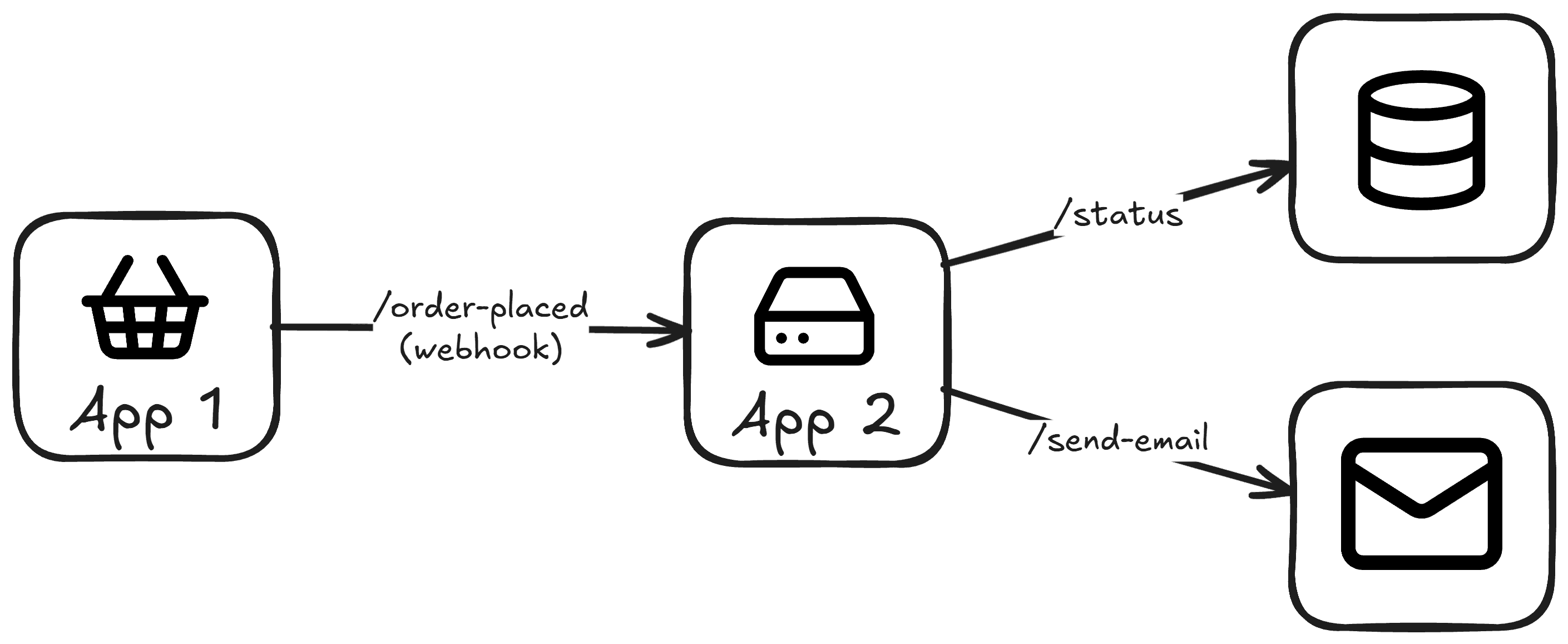 Webhook Example
In a recent project, I needed to implement a system that emitted webhooks, and as a result I began to research the anatomy of webhooks, how to create, consume and secure them.
Webhook Anatomy
A webhook typically a simple HTTP request (most often a POST) with a JSON payload and a set of headers used for security (explored in the next section).
The payload will contain the necessary metadata about the event, such as the event_id and an event_type (e.g. OrderPlaced, OrderUpdated).
The headers provide security-related information about the webhook. Commonly, one header contains the webhook's signature, while another includes a timestamp indicating when the webhook was sent.
X-Webhook-Signature - the webhook signature
X-Webhook-Timestamp - the timestamp of the request
Below is an example of a webhook request in cURL format:
  curl -X POST \
    -H "X-Webhook-Signature: a1b2c3d4e5f6g7h8i9j0k1l2m3n4o5p6q7r8s9t0u1v2w3x4y5z6a7b8c9d0e1f2" \
    -H "X-Webhook-Timestamp: 1609459200" \
    -d '{"event_id": "123456", "event_type": "order.success"}' \
    https://example.com/api/v1/events
Webhook Security
It is very important to secure webhooks to prevent unauthorized access and ensure the integrity of the data being sent. Below I will go over how I decided to go about securing my webhooks.
Shared Secret
Having a secret is used to sign webhook requests, and later used to validate the received signature on consumption.
This secret is shared across any applications emitting or consuming the webhooks.
To generate a secret for my webhooks I used openssl rand -base64 32 to create a high entropy (random) base-64 string.
Signature
After obtaining a secret to sign our webhooks, we need to create a signature.
There are various methods to construct a signature, however a common pattern is to append the timestamp (UNIX format - 1609459200) and the payload to the secret using a hashing algorithm (e.g. HMAC-SHA256).
- Append the timestamp and payload -> {{timestamp}}.{{payload}}
- Hash with secret using the HMAC-SHA256 algorithm
signature = HMAC-SHA256(secret, {{timestamp}}.{{payload}})
The above function creates the signature which is then sent as a header in the webhook request (e.g.X-Webhook-Signature).
Timestamp
In addition to the signature, a header containing the timestamp of the request (e.g. X-Webhook-Timestamp) is sent to ensure the request cannot be replayed at a later date (known as a replay attack).
A replay attack occurs when a malicious actor captures a legitimate webhook request and resends it at a later time. Since the request and signature are valid, the receiving server may process the same event multiple times, potentially causing duplicate actions such as repeated payments or duplicated records.
To mitigate this, the timestamp is included as part of the webhook request and is validated on consumption. If the timestamp falls outside of an acceptable time window (e.g. 5 minutes), the request is rejected. This ensures that even if a webhook request is intercepted, it cannot be replayed indefinitely.
Event / Webhook ID
Additionally, all webhooks should include a unique identifier (such as an event_id or webhook_id) to prevent duplicate events from being processed. This is important because webhooks may be delivered more than once, and ensuring each event is uniquely identified helps avoid handling the same event multiple times.
How does HMAC-SHA256 work?
HMAC-SHA256 is a hashing algorithm that takes a secret and a message, and then applies the hash function to create a cryptographically secure output. This is perfect for creating a signature for our webhook, and the process can be mimicked when consuming the webhook to ensure the validity of the signature.
Sending & Consuming Webhooks
Now that we are aware of the anatomy and security of a webhook, we can understand the process of sending and consuming webhooks.
Sending Webhooks
When sending webhooks we ensure to create a signature and a timestamp and send them as headers in the request.
  curl -X POST \
    -H "X-Webhook-Signature: a1b2c3d4e5f6g7h8i9j0k1l2m3n4o5p6q7r8s9t0u1v2w3x4y5z6a7b8c9d0e1f2" \
    -H "X-Webhook-Timestamp: 1609459200" \
    -d '{"event_id": "123456", "event_type": "order.success"}' \
    https://example.com/api/v1/events
Consuming Webhooks
When receiving the webhook, we run the same process using the contents of the webhook to reconstruct and validate the signature and the timestamp.
-
Ensure the timestamp is not out-of-date (i.e. the timestamp is not older than 5 minutes or in the future). If the event is out-of-date or in the future, we can ignore it.
-
Validate the signature. Reconstruct the signature using the secret (shared across applications) and the timestamp and payload from the request.
After, reconstructing the signature, we compare it to the signature received in the request. If the two match, then we can consider the webhook valid.
Debugging Webhooks
When working with third-party services like Stripe, validating incoming webhooks is straightforward, as they typically provide libraries with built-in methods for securely consuming and verifying webhook events.
In my case, however, I was building a system from scratch and needed a reliable way to debug webhooks as they were sent and received. To solve this, I created a lightweight HTTP inspector called Tiramisu.
Tiramisu allows me to inspect every part of a webhook request, including the payload and headers. I also added a webhook validation feature, making it easy to verify the authenticity of both incoming and outgoing webhooks.
Below is an example webhook request sent to Tiramisu:
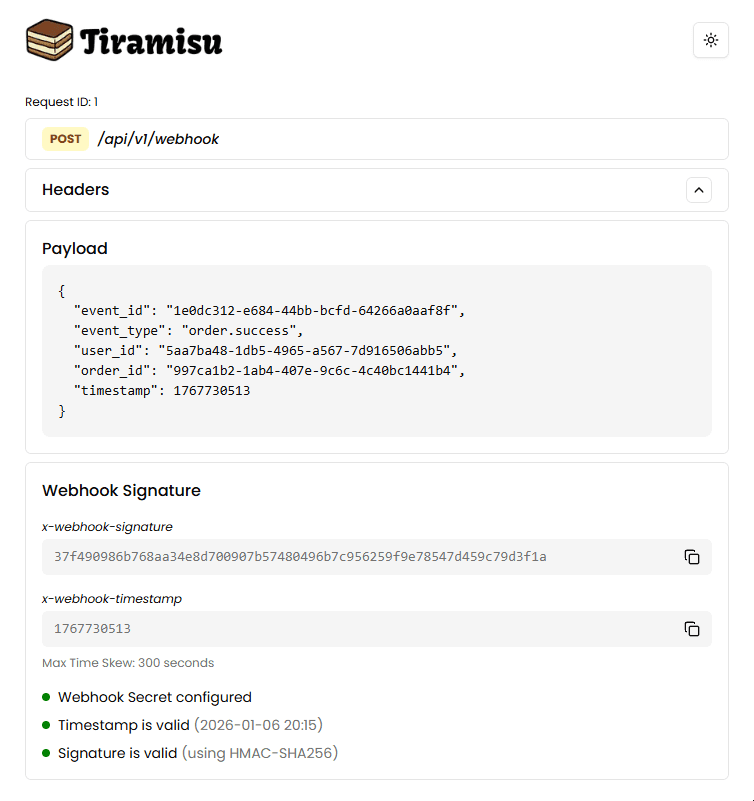 Webhook Inspection in Tiramisu
Check out the Tiramisu here: https://github.com/georgelopez7/tiramisu
Additionally, I have created a repository showcasing how to create and send a webhook using Go, with an instance of Tiramisu to inspect it.
Github: https://github.com/georgelopez7/webhook-go
Conclusion
In this article, we explored the anatomy of a webhook, how to create and consume them, and the best practices for securing webhook communication. I also demonstrated how to debug and validate webhooks using a tool called Tiramisu.